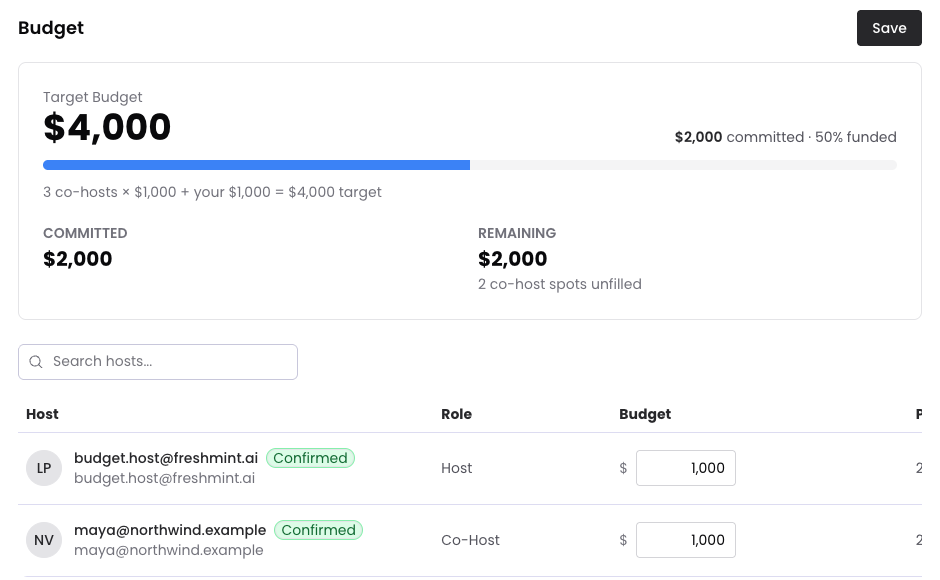
The Budget tab shows what the event costs and who is paying for it.
Who can see it
The primary host, members of the primary host's organization, and confirmed co-hosts. Sponsors do not see the Budget tab. A sponsor sees only their own ask, on the event's Overview.
Set the budget
The Sponsor Budget you set in the event's Sponsors section is the ask for each partner. Freshmint adds up the asks across your partner slots, plus your own share, to show the Target Budget.
On the Budget tab you can change each host's allocation and select Save.
Read the numbers
- Target Budget: the total you are aiming for.
- Committed: the allocations of confirmed hosts.
- Remaining: what is still unfunded, and how many partner spots are unfilled.
When every dollar is covered, the tab shows Budget fully committed.
Common questions
Does Freshmint collect payments from partners? No. The budget is for planning and alignment. Payments happen outside Freshmint.
Can I track actual spend? Not yet. The Budget tab tracks what each partner has committed.
Still need help?
Email support@freshmint.ai or use the form in the help center. A person on the Freshmint team reads every message.
Contact support