Contacts

Your organization's audience: how people get in, tags, importing from a CSV or Luma, and export.

Contacts holds everyone your organization has met through Freshmint, in one list your whole team shares. Open it from the sidebar.
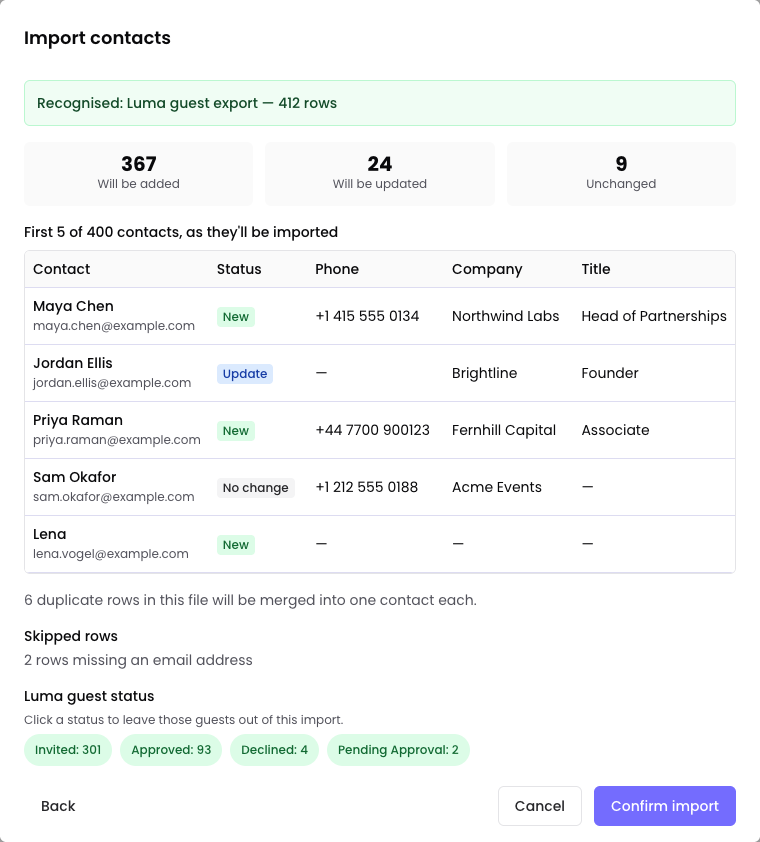
Importing a Luma guest list, with a filter to leave out guests by status.

How people get into Contacts

  • From your events. When an event completes, everyone on its attendee list is added to Contacts for every organization confirmed on the event: the primary host, co-hosts and sponsors. Each contact keeps the event and their status in their history.
  • Added by hand. Select Add Contact and enter a first name, last name and email. Phone is optional.
  • Imported. See below.

People already in your Contacts are not duplicated. When an event adds someone you already have, it only fills in fields that are blank. An import shows you which contacts it will add and which it will update before you confirm.

Import contacts

  1. Select Import.
  2. Choose where the file comes from:
    • Luma: export your guest list from Luma (Manage, then Guests), then drop the file in. You can leave out guests by their Luma status, for example people who were only invited.
    • Other CSV: any spreadsheet saved as CSV. Match its columns to Freshmint's fields. A Download CSV Template is available.
  3. Check the preview. It shows which contacts will be added, which will be updated, and any rows that will be skipped and why.
  4. Select Confirm import.

Files can be up to 4MB. For a larger list, split it into several files.

Undo Latest Import reverses your most recent import, within 24 hours.

Tags

Use tags to group contacts, for example "VIP" or "Customer". Select contacts and choose Add tags or Remove tags, or create a new tag with its own colors. You can include tags in an import, separated by a semicolon.

Find people

Search by name, email or tag. Filter by tag, and by date range: last 7, 30 or 90 days, last year, or a custom range.

A contact's profile

Open a contact to see their details, their tags, and every event of yours they registered for, with their status at each. You can edit their details, except their email, and names and phone numbers that come from the person's own Freshmint profile.

Export

Organization admins can select Export all to download every contact in the organization as a CSV. Filters are not applied to the export.

Use contacts for an event

On an event's Attendees tab, select Add, then Add from Contacts. See Add attendees.

Limits

The Free plan includes up to 5,000 contacts. Pro has no limit. See Plans: Free and Pro.

Contact support

Still stuck? Talk to a person.

Someone on the Freshmint team reads every message. Tell us what you were trying to do and what happened instead, and include the event link if it is about an event.

Email support@freshmint.ai
Contact support
How to reach the Freshmint team, and what to include so we can help quickly.
Emails from Freshmint are not arriving
What to check when a sign-in link, invitation or event email does not show up.
Delete your account
How to ask for your account and data to be deleted, and how it differs from cancelling.
Manage or cancel your subscription
Update your card, download invoices, or cancel Pro.
Invite your team
Add colleagues to your organization so they can work on every event with you.
Plans: Free and Pro
What each plan includes, and how to upgrade.
Connect your AI assistant to Freshmint
Connect Claude, ChatGPT, Grok Bot, Cursor or another AI assistant to Freshmint, and control what it can do.
Freshmint Copilot
Ask questions about your events, attendees and contacts, and get drafts and actions you approve first.
Collection links
One link that lists several of your upcoming events, so people can RSVP to any of them.
Contacts
Your organization's audience: how people get in, tags, importing from a CSV or Luma, and export.
Co-host and sponsor FAQ
Quick answers for partners working on someone else's event.
Getting started as a co-host or sponsor
You have been invited to someone else's event. Here is what to do first.
Share links and attribution
Every host has their own event link, and every registration is credited to whoever's link was used.
Event budget
Set a target budget, see what each partner has committed, and what is still unfunded.
Your sponsor package and sponsor link
Write what you offer partners, and share it through a private link that is not the attendee link.
Invite co-hosts and sponsors
Invite partners by email, track where each one is, and approve them.
Co-hosts and sponsors: what each role can do
The three roles on an event, and exactly what each one can see and do.
Calendar invites and change notices
The calendar invite in every confirmation, and what happens when the date, time or venue changes.
Write your own emails to attendees
Send or schedule your own message to attendees by status, preview it, and see who it reached.
Freshmint AI emails
The five emails Freshmint writes and schedules for every event, and how to review, change or turn them off.
Event analytics
See how many people view your event page and sponsor link, and what attendees said afterwards.
For attendees: registering, My Events and cancelling
What happens after you register for an event on Freshmint, and how to manage your registrations.
Event-day check-in
Turn on self check-in, how attendees check in from their phone, and how to check someone in yourself.
Add attendees
Add people one at a time, from your contacts, from a CSV, or from a past event's guest list.
Manage attendees
Approve registrations, change statuses one at a time or in bulk, choose who appears on the page, and export the list.
Cancel or delete an event
The difference between cancelling and deleting, who can do each, and who is told.
Duplicate an event
Start a new event from one you have already run, with the same page, questions and sponsor package.
Hide the address until people register
Keep the exact venue private, so only confirmed attendees and your hosts see it.
Capacity and the waitlist
Set how many attendees you can seat, and what happens when the event is full.
Edit an event after publishing
What you can change on a live event, and who gets told when the date, time or venue moves.
Registration questions
The fields every form asks for, adding your own questions, and when questions lock.
Design your event page
Themes, colors, fonts, your cover image, and Reimagine with AI.
How an event moves from Active to Live to Complete
The four event stages, when each change happens, and what you can still do afterwards.
Freshmint key terms
The words you will see across Freshmint, in plain language.
Create and publish your first event
Build your event page, add the details attendees need, and publish it in one step.
Set up your organization
Create your organization once so your logo and details appear on every event page and sponsor link.
Create your account and sign in
The three ways to sign in, and what to do when one of them does not work.
Welcome to Freshmint
What Freshmint does, how it is laid out, and where to start.